What is optical fiber? How it works, fiber types and how to choose
Optical fiber is a thin strand of glass that carries data using light. It plays a crucial role in links ranging from short connections inside data centers to enterprise data center interconnects (DCI), metro networks and regional backbones.
But not all fiber is the same. Choosing the right type affects reach, cost, capacity and how easily the network can scale. This article explains how optical fiber works, the main fiber types and what to consider when choosing fiber for point-to-point and DWDM networks.

How optical fiber works
One way to picture a fiber network is as a road network. Fiber itself, however, is tiny – about the same diameter as a strand of human hair – and the traffic it carries is in the form of light. To the human eye, light appears white, but it’s actually made up of many colors, each of which can carry its own channel of traffic.
Optical fiber is normally made from silica-based glass and consists of a core, cladding and coating. The light travels down the core. The cladding keeps the light from escaping through total internal reflection. Because of the properties of the core and cladding, the light stays inside the core even as the fiber runs up hills and around corners. The coating is added to protect from damage and moisture.
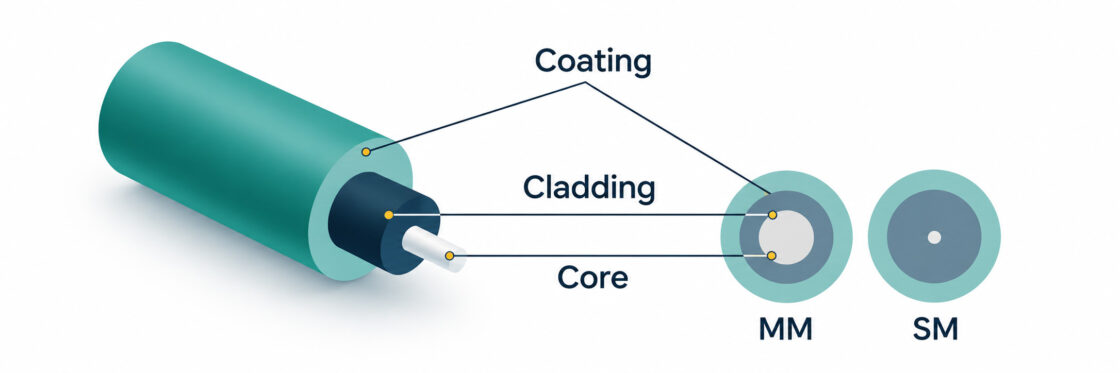
A single fiber can carry one wavelength or many. In a DWDM system, different wavelengths act like additional lanes on the same road, allowing multiple channels to share the same fiber.
Single-mode vs. multimode fiber
There are two primary types of optical fiber used in data networks: multimode (MM) and single-mode (SM). Multimode fiber has a larger core and allows multiple modes of light through the fiber. Single-mode fiber has a much smaller core and carries one mode of light.
| Multimode fiber | Single-mode fiber | |
| Core diameter | 50 or 62.5 µm | Around 9 µm |
| Best suited for | Short links inside data centers and buildings | DCI, campus, metro, regional and long-haul links |
| Optics | Lower-cost multimode optics | Single-mode laser optics |
| DWDM transport | No | Yes |
For short links, multimode can offer the lowest-cost solution. Single-mode is the standard choice when you need more reach, more upgrade flexibility or DWDM.
Multimode fiber: OM1 to OM5
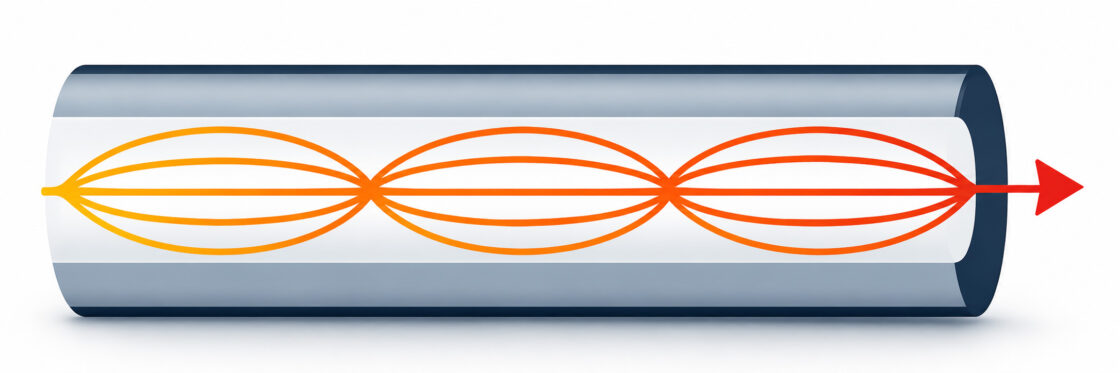
Multimode fiber optic cable allows multiple modes of light to pass through a large core. The advantage of this type of fiber is that lower-cost transceivers can be used. The trade-off is modal dispersion: different modes travel through the fiber in slightly different ways and arrive at different times, which limits reach as data rates increase.
What do OM1, OM2, OM3, OM4 and OM5 mean?
The OM classification describes different grades of multimode cabling. OM1 and OM2 are mainly found in legacy networks, while OM3, OM4 and OM5 are used for new installations.
| Grade | Core | Typical role |
| OM1 | 62.5 µm | Older 62.5 µm LAN and premises cabling (legacy) |
| OM2 | 50 µm | Higher-bandwidth 50 µm LAN and premises cabling (legacy) |
| OM3 | 50 µm | Laser-optimized high-speed short-reach links |
| OM4 | 50 µm | Higher-bandwidth short-reach links |
| OM5 | 50 µm | Wideband multimode for multiple short wavelengths |
Gradient-index multimode fiber
Gradient-index is the main multimode design used in modern OM fiber. With gradient-index multimode fiber, the light traveling close to the axis travels more slowly than the light near the cladding, which results in better grouping of the light rays. The refractive index diminishes gradually from the center axis out toward the cladding.
Single-mode fiber: cabling types and standards
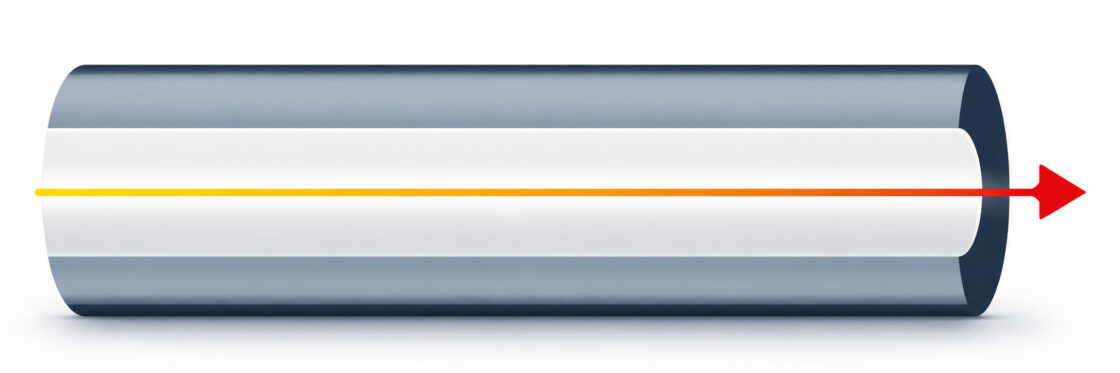
A single-mode optical fiber has a smaller core than multimode fiber and allows only one mode of light to travel through. Because there are fewer light reflections, it has lower signal attenuation and the light can travel farther. Single-mode optics use lasers as the source of light. The fiber still has the same 125 µm cladding as multimode fiber, but the core is typically around 9 µm instead of 50 µm or more.
Single-mode fiber has a higher bandwidth and is the most suitable type of fiber for long-distance networking. That makes it especially useful where reach, future capacity or the option to introduce DWDM can make your fiber network more future-proof and cost-efficient.
OS1, OS1a and OS2 single-mode cabling
If you are comparing OS1 vs. OS2, OS1 is now a grandfathered designation. For new installations, the relevant categories are OS1a, indoor-outdoor single-mode and OS2.
| Cabling type | Maximum attenuation at 1310/1550 nm | Typical use |
| OS1a | 1.0 dB/km | Inside plant and data centers |
| Indoor-outdoor | 0.5 dB/km | Links between buildings |
| OS2 | 0.4 dB/km | Outside plant and longer-reach links |
G.652 and G.657 fiber
The OS designation applies to the cabling. The fiber itself is commonly G.652.D or bend-insensitive G.657. Older routes may also contain specialized dispersion-shifted fiber, which can matter when you are qualifying existing dark fiber for a new optical system.
Which optical fiber type do you need?
The right choice of optical fiber depends on where the network sits. Metro builds may be constrained by construction and permitting, DCI links by leased fiber pairs and cross-connect costs, internet exchanges by rapid traffic growth and private networks by the need to scale without repeatedly rebuilding the physical layer. Those conditions can change what matters most in the decision.
“If you have plenty of fiber, that’s one thing. But when fiber is limited or expensive, you start thinking differently. Then it’s not just about reaching from A to B – it’s about how much capacity you can get out of the fiber you already have. That’s where single-mode and DWDM become really interesting.”
— Kent Lidström, CTO, Smartoptics
Optical fiber for dark-fiber and DWDM networks
With dark fiber, you control the optical layer yourself. DWDM lets you get much more capacity from that fiber by carrying many independent wavelengths over the same fiber pair, increasing capacity without laying or leasing additional fiber. For new WDM deployments, it is the standard choice, allowing you to add wavelengths as capacity grows and use amplification and dispersion compensation for longer spans where required.
If you are building over leased or existing dark fiber, use the characteristics of the route to calculate the optical link budget before choosing the optics:
- fiber type and route length
- fiber attenuation
- connector, splice, patch-panel and mux/demux losses
- whether amplification or dispersion compensation is needed
Get more from your fiber network
Choosing the right optical fiber is only one part of building an optical network that can scale. Smartoptics combines optical transceivers, open line systems, transponders and muxponders with end-to-end optical networking expertise to help you increase capacity, extend reach and make better use of the fiber you already have.

Related articles

What is a SAN ( Storage Area Network) and how does it protect mission-critical workloads?

What is Fibre Channel used for?